In April 2024, the Department of Justice finalized its update to ADA Title II, formally adopting WCAG 2.1 Level AA as the accessibility standard for digital services provided by state and local governments. This includes websites, mobile apps, and online documents used to deliver public programs, services, or activities.
While much of the attention has focused on websites, digital documents often receive less scrutiny—despite carrying significant accessibility risk under the rule.
Why this matters
For state and local governments, digital documents are not supporting content—they are often the service itself.
Benefits applications, eligibility notices, court filings, utility bills, permits, licensing instructions, and official communications are routinely delivered almost entirely through PDFs and other document formats.
Under ADA Title II rule, an inaccessible online document can render an otherwise accessible website unusable—creating a compliance failure.
What Title II actually requires for digital documents
The finalized rule is codified at 28 CFR Part 35, Subpart H, and applies to digital content used to provide government programs, services, or activities.
Although the regulation references “web content and mobile applications,” the DOJ routinely applies it to digital documents when they are used to deliver public services.
What this includes in practice
- PDFs
- Word, Excel, and PowerPoint files
- Cloud-based documents and forms
Key clarification: Active vs. archived documents
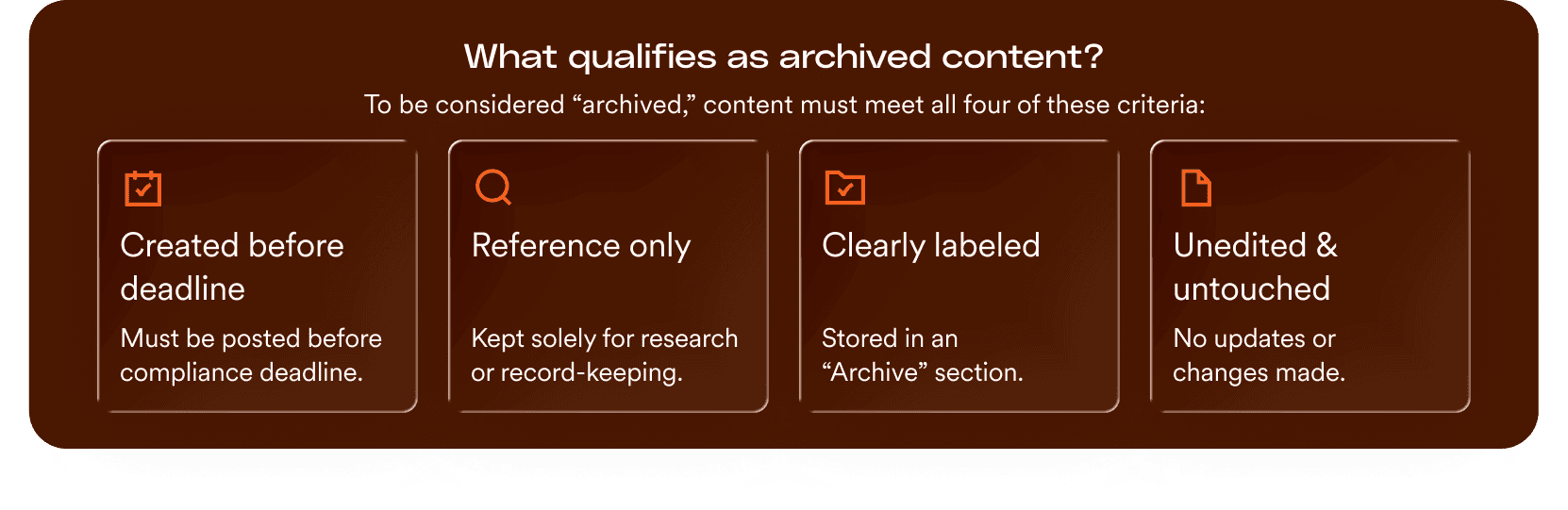
Under ADA Title II, a document’s age does not automatically exempt it from accessibility requirements. If a digital document—no matter when it was created—is actively used to apply for, gain access to, or participate in a public entity’s services, it must conform to WCAG 2.1 Level AA.
- It was created before the entity’s compliance date.
- It is retained exclusively for reference, research, or recordkeeping.
- It is kept in a dedicated, clearly identified archive area.
- It has not been altered since it was archived.
Bottom line: If a document is part of a current administrative or service-delivery workflow, it must be accessible, regardless of its original format or date of creation.
Online documents: the backbone of public service delivery
The DOJ’s position is clear: when online documents are used to deliver government programs or services, they are treated as core service components—not optional or supporting content. This interpretation reflects how public services are actually delivered.
Applications, notices, bills, court materials, permits, and official instructions are commonly issued as PDFs or other digital files. When these documents are required to apply, respond, pay, or comply, they function as the service itself—not supporting content.
As a result, state and local agencies rely on documents across nearly every core function.
Benefits and health services, courts and due-process systems, licensing and permitting, utilities and public payments, and transit and transportation services all depend on document-based workflows.
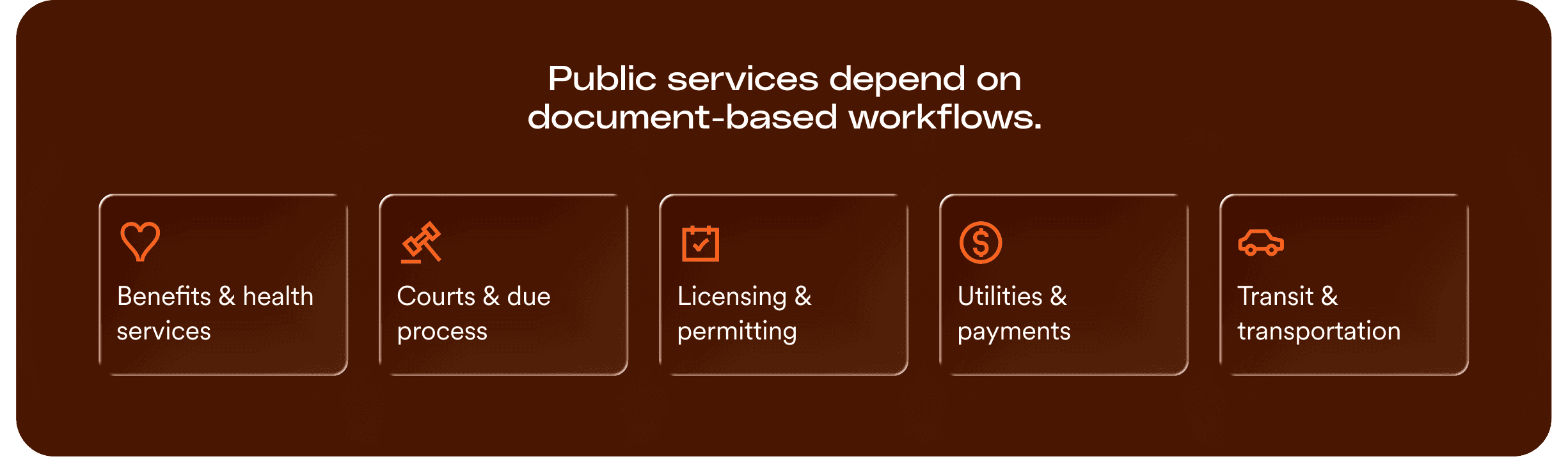
In practice, completing a government task often means locating, reading, and submitting one or more required documents.
This reliance has direct implications for access.
One in four U.S. adults has a disability, and many depend on assistive technologies—such as screen readers, keyboard navigation, or predictable reading order—to use digital content.
When required documents are inaccessible, people cannot complete forms, understand notices, meet deadlines, or exercise rights. For essential public services, inaccessible documents do not slow access—they stop it entirely.
Where agencies most often underestimate document risk
State and local government agencies tend to encounter the same document-related accessibility issues, which are often underestimated in scope.
Agencies most often run into trouble when they rely on:
- Large backlogs of legacy PDFs that were never reviewed or structured for accessibility
- Forms produced by older or vendor systems that do not support accessible output
- Vendor-generated notices or determinations assumed to fall outside agency responsibility
- Document-heavy portals and workflows with little or no accessibility testing
A new and growing risk: AI-generated documents
The DOJ’s April 2026 interim final rule named generative AI as an emerging compliance risk — and documents are where this gap is most acute.
Government agencies are already using generative AI to draft notices, create form content, and generate documents that are published as PDFs and distributed through public-facing services. That content isn’t accessible by default. AI-generated documents often lack the proper tagging and structure that assistive technologies need to interpret them correctly.
Unlike legacy document backlogs — which are a known quantity — AI-generated documents represent an ongoing and growing gap. New inaccessible content is being created faster than remediation workflows can catch it.
Generative AI is creating public-facing content at scale. The accessiBe platform offers solutions that can help find and remediate those gaps — regardless of how the content was created.
A common misconception: alternate formats and “available upon request”
Many agencies assume they can post inaccessible documents and fix the problem later by offering an alternate format or help “upon request.”
That assumption is incorrect.
Providing a different version later—or offering to help after someone asks—does not solve the problem when the document itself is how people apply, respond, pay, or meet deadlines.
If someone needs the document to use the service, they should not have to ask for special access to it.
In practice, this means:
- Required documents cannot be inaccessible by default
- Accessibility cannot depend on a request, phone call, or workaround
- The primary document must work for people using assistive technologies
The underlying issue: why online documents are typically inaccessible
Accessibility issues are widespread across digital properties, but online documents present a consistently higher risk of failure than websites.
Large-scale testing of public-facing websites shows only a small fraction of PDFs meet even basic accessibility criteria, with the majority failing multiple checks at once.
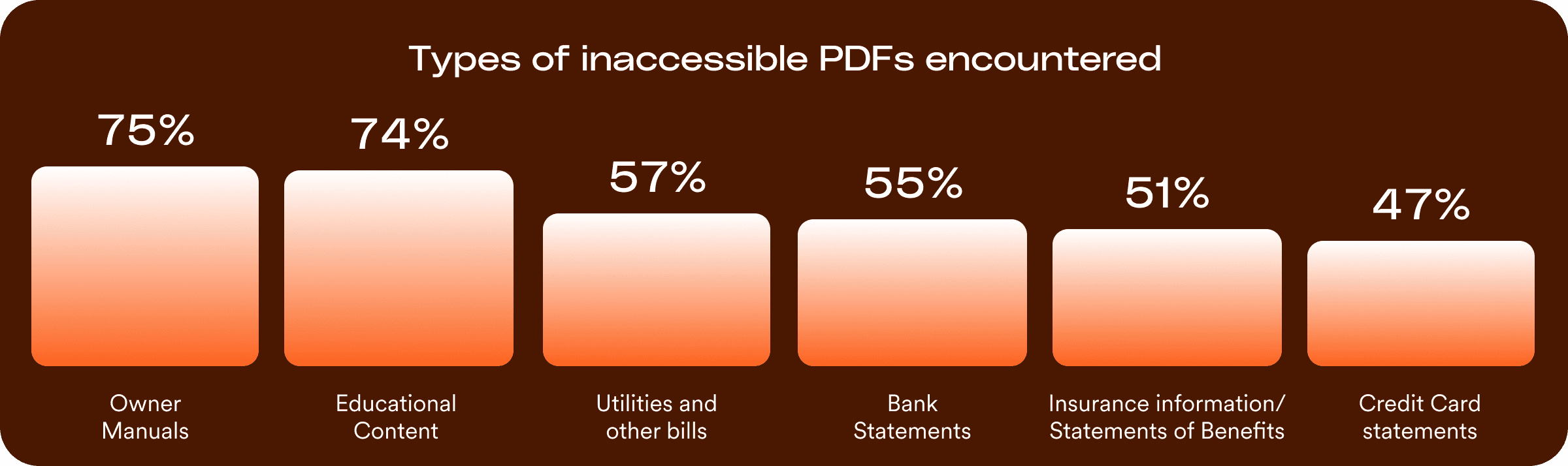
There are two primary reasons for this:
- Documents are created without accessibility built in.
Online documents are typically produced without proper tagging, logical reading order, or labeled form fields. PDF accessibility research consistently identifies these structural issues as the most common causes of document inaccessibility, making many files inaccessible by default rather than partially usable. These failure modes are far less common in modern HTML content, where accessibility support is more standardized and routinely tested. - Document failures scale quickly across services.
As a result, document accessibility problems tend to be systemic rather than isolated. Government agencies frequently reuse the same templates and forms across departments and programs, meaning a single inaccessible document can be distributed thousands of times and embedded across multiple services—blocking access at scale.
Why document accessibility draws DOJ scrutiny
Applications, notices, bills, determinations, and instructions are often delivered entirely through PDFs or other digital files, making those documents inseparable from the service itself.
Because of this, the DOJ enforcement treats documents as core service components, not supporting content. In enforcement actions, agencies are routinely required to remediate document inventories, fix templates, establish accessible document practices, and implement ongoing oversight—often regardless of website improvements.
The DOJ has also made clear that workarounds are not enough.
Phone assistance, post-request accommodations, or alternate formats do not satisfy Title II when documents are required to apply, respond, pay, or exercise rights. If the document isn’t accessible at the point of use, the DOJ views the service as inaccessible.
What a defensible document accessibility program actually means
Under Title II, the DOJ does not expect every document to be perfect. What the DOJ looks for is whether an agency has put clear, ongoing practices in place to ensure required documents are accessible and whether those practices are being followed.
A defensible document accessibility program is one an agency can show, not just describe.
If challenged, the agency can point to how it identifies required documents, how it decides what to fix first, how new documents are reviewed before publication, and how known issues are tracked and resolved over time.
What this looks like in practice
A defensible program typically includes the following concrete actions:
- Identifying required documents:
Maintaining an inventory of documents that people must use to apply for benefits, submit forms, receive notices, pay bills, meet deadlines, or exercise rights. - Prioritizing by service impact:
Fixing or replacing documents that are high-traffic, time-sensitive, or service-critical before addressing lower-impact materials. - Using defined document workflows:
Requiring accessibility checks when documents are created, updated, or published, rather than relying on one-time remediation projects. - Managing vendor-generated documents:
Applying accessibility requirements to documents produced by vendors and having a clear process for remediation when vendor output is inaccessible. - Keeping records of activity:
Retaining inventories, audit results, remediation logs, staff training records, and monitoring reports to show ongoing effort.
The DOJ has made clear that reactive approaches are not enough.
Offering phone assistance, handling requests individually, or fixing documents only after complaints does not substitute for accessible documents when those documents are required to complete a service.
What agencies should prioritize now to be defensible by April 2026

The DOJ’s guidance and enforcement patterns make one point clear: defensibility under Title II is demonstrated through prioritization, repeatable processes, and documentation—not by claiming everything has been fixed.
Agencies working toward defensibility by April 2027 should focus on the following actions:
1. Prioritize documents that are required to use services
Start with documents people must use to apply for benefits, complete transactions, meet deadlines, exercise rights, or receive due-process protections. These documents carry the highest public impact and enforcement risk.
2. Inventory documents by service dependency, not volume
Identify which documents are essential to completing a service, rather than attempting to remediate all PDFs at once. A smaller set of service-critical documents matters more than a large count of low-impact files.
3. Replace critical PDFs with accessible HTML where feasible
When documents function as interactive services—such as applications, instructions, or payment steps—accessible HTML is often more sustainable and easier to test than remediating complex PDFs.
4. Establish repeatable document accessibility processes
Define how documents are created, reviewed, published, and remediated on an ongoing basis so accessibility issues do not reappear with each new document.
5. Address vendor accountability through contracts
Documents generated by vendor systems remain the agency’s responsibility under Title II. Procurement and renewal cycles should include accessibility requirements, remediation timelines, and clear escalation paths.
6. Maintain documentation of good-faith progress
Keep records of inventories, prioritization decisions, audits, remediation work, training, and monitoring. These materials provide critical evidence of sustained effort if the agency is challenged.
The time is now to act on document accessibility
For many public entities, the most immediate Title II risk sits in required public documents used for services such as permits, applications, notices, and payments that residents depend on every day. Ensuring these materials remain accessible across thousands of files, departments, and service updates can be difficult to manage consistently.
Document accessibility often requires specialized remediation, manual review, and coordination across multiple teams. And because digital services and public information are updated regularly, accessibility cannot be treated as a one-time effort.
accessiBe works alongside public entities to support both immediate remediation needs and long-term accessibility oversight.
Expert document remediation
Our accessibility specialists assist agencies with reviewing and remediating high-risk PDFs, forms, and public documents so they are usable by assistive technologies and aligned with WCAG requirements.
Tools that support agency technology teams
Developer-focused tools help teams understand accessibility status across websites, service portals, and digital platforms, providing visibility into issues and guidance for ongoing improvements.
Automation that supports ongoing accessibility
AI-driven monitoring helps identify recurring accessibility issues as content changes, helping agencies maintain coverage without overwhelming internal teams.
Structured oversight and reporting
Accessibility activity is documented and tracked over time, creating a record of progress, remediation efforts, and oversight aligned with Title II expectations.
Because digital services across government evolve continuously, accessibility requires sustained monitoring and coordination across systems. We work alongside agency teams from initial assessments through ongoing remediation and oversight.
Speak with a Title II accessibility expert for a one-on-one review of your institution’s document and platform strategy.
Frequently asked questions about government document accessibility
Q1. What does ADA Title II require for state and local government documents?
A1. Under the 2024 Title II Final Rule, state and local government agencies must ensure that all digital content used to deliver programs, services, and activities—including PDFs, Word documents, and spreadsheets—is accessible to people with disabilities. To meet this legal mandate, these documents must conform to the technical standards of Web Content Accessibility Guidelines (WCAG) 2.1 Level AA.
Q2. When is the deadline for our agency to comply with Title II?
A2. Compliance deadlines are determined by the population size the public entity serves. Large public entities (serving 50,000 or more people) must ensure their digital documents and content are conformant by April 28, 2027. Smaller entities (serving fewer than 50,000 people) and special district governments have until April 28, 2028, to meet the same standards.
Q3. Does the rule apply to “legacy” documents created years ago?
A3. Yes. A document’s age does not automatically exempt it from Title II requirements if it is currently used to apply for, gain access to, or participate in an agency’s services. While there is a narrow exception for “archived web content,” it only applies to files kept exclusively for historical reference in a dedicated archive area that have not been altered since being archived.
Q4. Can we provide an “accessible version upon request” instead of remediating files upfront?
A4. No. Federal guidance is clear that a reactive “upon request” model is insufficient for documents required to complete a public service. Because these documents often function as the service itself (such as a benefits application or permit form), they must be accessible by default so that all residents have an equitable and timely experience from the start.
Q5. Are agencies responsible for the accessibility of documents generated by third-party vendors?
A5. Yes. Public entities are legally responsible for the accessibility of any digital content they “provide or make available,” regardless of whether it was produced in-house or by a third-party contractor. It is essential for agencies to include accessibility requirements in future vendor contracts and verify that any provided documents conform to WCAG 2.1 Level AA.
Q6. What are the core technical elements of an accessible government PDF?
A6. To conform to WCAG 2.1 Level AA, a PDF must be properly tagged to define its structure for screen readers. It must also feature a logical reading order, searchable text (not scanned images of text), descriptive alt text for meaningful images, and sufficient color contrast for readability. Proper tagging is the foundation of an accessible PDF. Tags define the document’s structure — headings, paragraphs, lists, tables — so assistive technologies can interpret and navigate the content correctly. An untagged PDF is effectively invisible to a screen reader, regardless of how the visual content appears. Tagging must be applied intentionally during document creation or remediation — it cannot be assumed from visual formatting alone.
Q7. How can accessiBe support our agency’s path to 2027 readiness?
A7. As part of its end-to-end accessibility platform combining the best in AI automation, human expertise, and developer tools, accessiBe’s expert services help agencies tackle high-volume document remediation. Our team of specialists review and remediate complex documents, providing an Accessibility Validation Report to confirm your files meet WCAG 2.1 Level AA standards.
Q8. The Title II deadline was just extended — does that change document remediation priorities?
A8. The DOJ extended compliance dates by one year — April 26, 2027 for larger entities, April 26, 2028 for smaller ones. But document accessibility gaps didn’t move with the deadline. A majority of public-facing PDFs still fail basic accessibility checks, and documents are often the service itself. The extension provides more time to build a structured, defensible document program — it doesn’t reduce the obligation to have one.
Q9. Our agency uses generative AI to draft documents and notices. Do those need to be accessible?
A9. Yes. The DOJ’s April 2026 interim final rule specifically named AI-generated content as an emerging compliance risk. If a document is created using generative AI and published as a public-facing file — a notice, a form, a policy document — it must still conform to WCAG 2.1 Level AA. Generative AI does not produce properly tagged, accessible documents by default. Agencies should establish a review step for AI-generated documents before publication. Generative AI is creating public-facing content at scale. The accessiBe platform offers solutions that can help find and remediate those gaps — regardless of how the content was created.