

In short:
- ADA Title II requires public colleges and universities to provide equal access to all programs, services, and activities, including digital systems and content. Under the DOJ’s 2024 Final Rule, public higher education institutions must ensure that websites and mobile applications conform to WCAG 2.1 Level AA by April 2026. This module explains how Title II applies in practice, what types of digital systems are typically in scope, and why institutions often struggle to define and defend accessibility decisions across complex academic and administrative environments, drawing on original survey research of public colleges and universities
Digital accessibility in higher education is often discussed in regulatory terms — deadlines, standards, compliance frameworks. For the people who rely on these systems, it’s simpler.
For a student with a disability, it’s whether they can register for classes independently, access financial aid, read a required syllabus before the first day, or complete a housing form without barriers.
Inside the institution, those same systems may be spread across departments — some built in-house, others vendor-managed, often maintained by IT teams who are not accessibility specialists. Accessibility becomes one responsibility among many.
In 2024, the Department of Justice set a clear timeline for digital accessibility in higher education. On April 20, 2026, the DOJ extended compliance deadlines by one year: April 26, 2027 for larger institutions, April 26, 2028 for smaller ones. The extension acknowledges the operational complexity institutions face. It does not reduce the expectation that institutions demonstrate intentional, structured progress. The question is no longer whether accessibility matters, but how that responsibility applies in practice — and whether institutions are using this window to close real gaps.
The question is no longer whether accessibility matters, but how that responsibility applies in practice.
About the research
Our higher education readiness survey—conducted in partnership with disability community leaders—captured insights from 300 public college and university administrators. The findings explore how institutions are managing the transition toward proactive digital inclusion under the ADA Title II Final Rule. This article focuses on exactly what public colleges and universities are responsible for and why defining digital scope is essential for institutional compliance.
What you need to know about ADA Title II, in plain language
ADA Title II applies to public colleges and universities, as well as other public education institutions such as K-12 school systems, and requires that people with disabilities have equal access to programs, services, and activities.
That obligation is not new.
What is new is how clearly the Department of Justice (DOJ) has stated that digital systems and content are now core to how higher education delivers instruction—and Title II applies to them.
What is the deadline for compliance?
In April 2024, the DOJ formally clarified this by issuing a Final Rule on digital accessibility. On April 20, 2026, the DOJ extended compliance deadlines by one year. There are now two separate deadlines:
- April 26, 2027 — for public institutions serving 50,000 or more people
- April 26, 2028 — for smaller institutions and special district governments
The extension applies to dates only. The WCAG 2.1 Level AA standard and the full scope of what must be accessible remain unchanged.
Does Title II apply to your institution?
A simple way to think about it: if students or the public rely on a digital tool to interact with your institution, it likely needs to be accessible under ADA Title II.
In education, that includes digital content students use to:
- Access course materials and readings
- Complete assignments and exams
- Apply for admission, financial aid, or housing
- Register for classes
- Access required academic or administrative information
AI-generated content: The DOJ’s April 2026 ruling named generative AI as an emerging compliance risk. Content created using AI tools — course materials, notices, documents, communications — must still conform to WCAG 2.1 Level AA. Generative AI doesn’t produce accessible content by default, and that content belongs in scope.
Most institutions understand that accessibility extends beyond the homepage. But applying it consistently across systems is more difficult.
In our national survey of 300 public colleges and universities, accessibility efforts extend beyond websites — to documents, forms, and vendor platforms. Still, coverage is uneven.
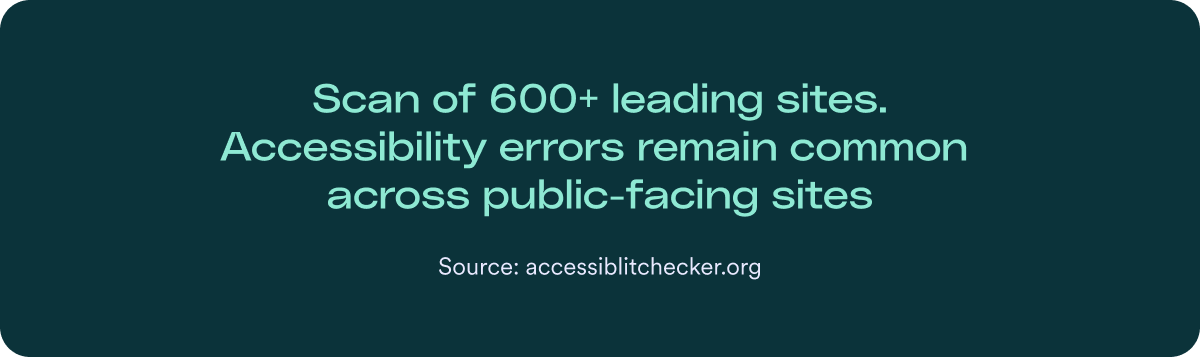
Our scan of 600 public-sector and higher education websites reinforces this.
Accessibility errors remain common across public-facing sites, highlighting how complex digital environments can make consistent accessibility difficult to maintain.
This isn’t about misunderstanding the law. It’s about operational complexity — defining and managing accessibility across learning platforms, portals, documents, and distributed academic systems.
Function over format: The “purpose” rule
Under ADA Title II, what a digital resource is used for matters more than what format it takes.
If a student must rely on it to participate in academic life, complete coursework, or receive required services, it must be accessible
Ask yourself: Does a student need this to complete a task or succeed in a course?
Example: If a professor provides a required reading list, every file on that list must be accessible. It doesn’t matter whether the material is posted on a webpage or shared as a PDF — students must be able to use it independently.
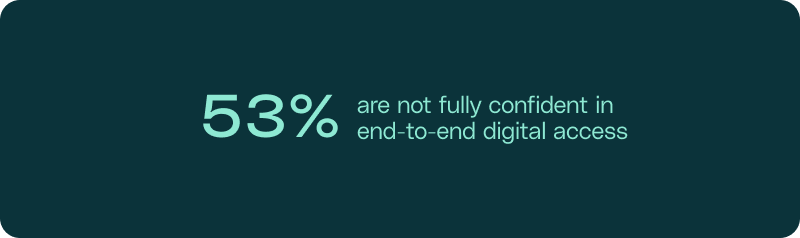
When institutions were asked whether students can complete all required digital tasks end-to-end, confidence drops. A majority are not fully confident that access works consistently across required systems and materials.
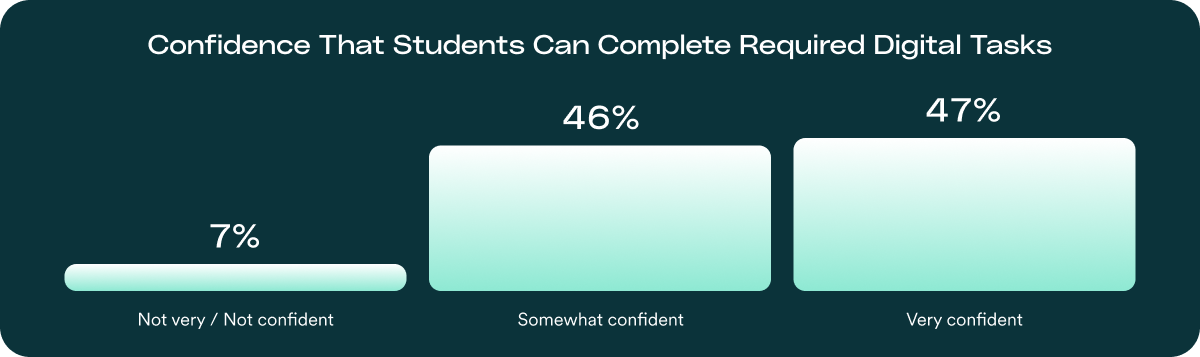
This confidence gap helps explain why enforcement doesn’t happen evenly across all digital content.
Risk tends to concentrate in required systems. Most institutions deliver services through learning platforms, enrollment tools, financial aid portals, and other workflows students depend on daily. When accessibility breaks down in these high-impact areas, the consequences are immediate and visible. These are the digital “hot zones” where enforcement risk is most likely to surface.
Our research reinforces this pattern.
Accessibility errors remain widespread across public-facing environments, showing how difficult it can be to maintain consistent accessibility across complex digital ecosystems — even when governance structures are in place.
The higher education litigation landscape: Where accessibility risk concentrates
While the obligation to provide equal access applies to your entire digital footprint, enforcement activity consistently concentrates in specific areas of the student experience:
Understanding these patterns helps institutions prioritize their efforts where they matter most for both student success and legal defensibility.
Hot zone 1: Instructional materials and course content
Instruction is the core “program” of any public college or university. When students cannot access required materials, they are effectively excluded from the educational experience.
- The common barriers: Scanned PDFs used as required readings, Learning Management System (LMS) modules that don’t support keyboard navigation, and videos without captions.
- Why it’s high risk: Because these barriers affect daily participation and academic performance, they are the most frequent source of student complaints.
Hot zone 2: Admissions and financial aid portals
Admissions and financial aid systems control access to education itself. These processes are mandatory, time-sensitive, and increasingly delivered entirely online.
- The common barriers: Financial aid forms that aren’t compatible with screen readers or admissions portals that time out before a user using assistive technology can finish.
- Why it’s high risk: Digital barriers here can prevent prospective students from even enrolling, making it a clear case of “denial of service” under Title II.
Hot zone 3: Student services and enrollment systems
Beyond the classroom, students rely on digital systems to manage their lives on campus. This includes registration, billing, and housing platforms.
- The common barriers: “Submit” buttons that can’t be clicked via keyboard or student account portals with poor color contrast that makes tuition balances unreadable.
- Why it’s high risk: These systems are transactional and mandatory. If a student can’t pay their bill or register for classes independently, the institution is failing its Title II obligations.
Hot zone 4: Required policies and institutional notices
Institutions routinely publish essential information such as codes of conduct, academic policies, and Title IX notices digitally.
- Common barriers include policies posted exclusively as scanned image PDFs that screen readers cannot interpret.
- Why it’s high risk: These materials govern student rights and responsibilities. If students with disabilities cannot access the rules they are expected to follow, institutions face significant exposure.
Hot zone 5: Disability services and accommodation workflows
Ironically, systems designed to support students with disabilities can introduce some of the most significant barriers.
- The common barriers: Accommodation request portals that are not accessible or inaccessible forms required to initiate support services.
- Why it’s high risk: When the process for requesting help is itself a barrier, it creates a “compounded harm” that is very difficult to defend in an enforcement action.
Why institutions struggle to operationalize ADA Title II

Even institutions making good-faith efforts often struggle to apply ADA Title II consistently in practice. These challenges are rarely about misunderstanding the law. Instead, they stem from operational complexity, decentralized ownership, and unclear scope definitions across digital systems.
While many institutions report documenting how accessibility decisions are made, nearly one-third describe that documentation as partial or unclear — reinforcing how easily scope and prioritization can drift across decentralized academic environments.
Let’s break down the top 5 reasons for these mistakes:
Reason #1: They treat all academic content as equally urgent
Many institutions assume every single digital asset must be remediated at once. However, Title II focuses on program access and functional impact rather than universal simultaneity.
- The risk: When you try to fix everything at once, resources are spread too thin. This “flat” approach causes high-impact materials (like active course assignments) to compete for attention with low-impact content. Ultimately, it stalls progress on the workflows students need most.
- The better approach: Focus on your most active and essential services first. Prioritize fixing “show-stopping” barriers on high-traffic pages, such as Learning Management System (LMS) login portals, active course modules, and emergency alert systems.
Reason #2: They think only the “website” matters
While many institutions naturally focus their accessibility efforts on their public-facing homepages, research and oversight patterns suggest that the most significant hurdles for students often reside in “hidden” content. This includes the essential tools students use every day, such as course documents, financial aid forms, and student portals.
- The risk: If you only focus on your web pages, you leave out the tools students use to actually get things done. When a student can’t read a syllabus PDF or fill out a digital enrollment form, the academic program is effectively closed to them. This creates a major gap in access and increases legal risk.
- The better approach: Focus on the tools students actually rely on to complete required tasks. If a form, document, or portal is necessary to participate in coursework or access a service, it needs to be accessible — regardless of whether it lives on a webpage, inside an LMS, or as a PDF. Title II is aligned with this impact-based view.
Reason #3: They assume faculty-created content is “exempt”
A common misconception is that faculty-created materials are exempt because of academic freedom or decentralized ownership. Title II does not distinguish content by author.
- The risk: If students must access the material to participate in instruction, the institution remains responsible for its accessibility. Faculty ownership does not remove institutional responsibility.
- The better approach: Empower faculty with an ecosystem of tools that make it easier to create accessible content from the start, ensuring that “born accessible” materials become the campus standard.
Reason #4: They assume “old” course content is automatically out of scope
Age alone does not determine responsibility. Content is not exempt from the ADA simply because it is from a previous semester. Its status depends on its use, not the date it was created.
- The risk: If a legacy syllabus or required reading posted as a PDF is still referenced in an active course, it is considered active content. Leaving these files inaccessible creates a roadblock for students and leaves the institution open to risk.
- The better approach: To be exempt because of its age, content must be truly archived. For a file to qualify as “archived” and stay as-is, it must meet four strict rules: it was created before the deadline, is used for reference only, is clearly labeled in an “Archive” section, and remains completely unedited.
Reason #5: They treat LMS accessibility as a vendor-only issue
Learning platforms and third-party educational tools are central to modern higher education, but responsibility for accessibility cannot be fully outsourced.
- The risk: Letting automated vendor results dictate strategy often leads to missing barriers in critical workflows. The DOJ focuses on whether students can actually access instruction, not on the vendor’s contract or scan scores.
- The better approach: Take accountability for how platforms are configured and how content is maintained. Require vendors to provide an up-to-date VPAT® (Accessibility Conformance Report), and when risk is high, consider independent third-party validation of critical workflows — especially those tied to instruction, enrollment, and financial aid.
Even when a platform is vendor-managed, institutions remain responsible for how it is implemented and used. Accessibility must be evaluated based on student experience in practice — not solely on vendor documentation.
What enforcement looks like — and why it matters
Meeting ADA Title II isn’t just about avoiding enforcement. It’s about ensuring people with disabilities can fully access public services, education, and essential programs.
That said, if a public entity does not comply, enforcement can happen.
Individuals may file complaints or lawsuits, and the U.S. Department of Justice (DOJ) can investigate and require formal remediation. Courts can order accessibility fixes, policy changes, and ongoing reporting.
Monetary damages are possible in limited circumstances — typically only if intentional discrimination (often defined as “deliberate indifference”) is proven.
Most Title II cases result in structured remediation and oversight — not automatic fines. The greater risk is being required to fix systems under external deadlines rather than through a planned, defensible approach.
How accessiBe supports higher education institutions under Title II
Preparing for the April 2027 and 2028 deadlines is challenging, even with the extension. Digital environments in higher education are constantly evolving and rarely managed by a single team. Accessibility is often layered onto already full IT, academic, and compliance responsibilities. Institutions that use this window to build structured, documented programs will arrive at the new deadline in a far stronger position than those that treat the extension as permission to wait.
AI-driven automation for scale
Higher education sites change constantly — new content, updates, seasonal deadlines. Continuous monitoring helps address recurring accessibility issues early, providing consistent coverage without overwhelming internal teams.
Tools for technical teams
Institutional developers are rarely accessibility specialists. Developer-focused tools provide clear visibility into accessibility status across portals, LMS integrations, and custom systems, along with practical guidance that supports teams from implementation through ongoing updates.
Expert support where judgment is required
Accessibility specialists assist with complex documents, instructional materials, nuanced claims, and remediation strategy.
All activity is tracked and compiled into structured reports reflecting findings, actions taken, and progress over time — creating a sustained record of oversight and measurable effort.
Because digital content evolves each semester, accessibility cannot be treated as a one-time project. Ongoing monitoring and reporting remain essential. We work alongside institutional teams every step of the way, from initial audits through continued remediation and oversight.
If your institution is preparing for the April 2027 deadline, our Title II specialists can help review your current approach and identify practical next steps. Book a call
Frequently asked questions
What is the ADA Title II rule for public colleges and universities?
In April 2024, the Department of Justice (DOJ) finalized a rule under Title II of the Americans with Disabilities Act (ADA) requires public education institutions — including universities, colleges, community colleges, and K-12 school systems to ensure their digital services, including websites and mobile applications, are accessible to people with disabilities. The rule formally adopts Web Content Accessibility Guidelines (WCAG) 2.1 Level AA as the mandatory technical standard for compliance.
When is the deadline for our institution to comply?
Compliance deadlines depend on the population size served by the institution. Large public entities (serving 50,000 or more people) must meet the standard by April 24, 2026. Smaller institutions (serving fewer than 50,000 people) and special district governments have until April 26, 2027, to ensure their digital systems and content are conformant.
Does Title II apply to course materials in Canvas, Blackboard, or other LMS?
Yes. The rule applies to all digital content used to deliver an institution’s “programs, services, or activities,” which explicitly includes academic course materials and virtual events. Any syllabus, reading, assignment, or video shared through a Learning Management System (LMS) must conform to WCAG 2.1 Level AA by the applicable deadline.
Are older or legacy course materials automatically out of scope?
Not necessarily. A document’s status depends on its use, not its creation date. If a legacy PDF or lecture slide is still referenced in an active course or used to access institutional services, it is considered active content and must be made accessible. Only content that is truly archived—meaning it is kept solely for reference, is clearly labeled as an archive, and remains unedited—may qualify for a narrow exception.
Can we rely on “available upon request” for student accommodations?
No. Federal guidance clarifies that public institutions can no longer rely on a reactive “upon request” model for essential digital services. Title II requires that required digital content be accessible by default up front, ensuring students with disabilities have equal access from the moment materials are made available.
Is the university responsible for the accessibility of third-party educational tools?
Yes. Under ADA Title II, institutions are responsible for the accessibility of any digital service they “provide or make available,” including those provided through third-party vendors. This includes student portals, library databases, and enrollment systems. It is essential to bake accessibility requirements into procurement contracts and request Voluntary Product Accessibility Templates (VPATs) to verify conformance.
How can accessiBe help our institution meet these Title II requirements?
As part of an end-to-end accessibility platform combining the best in AI automation, human expertise, and developer tools, accessiBe provides several solutions to support campus-wide compliance. accessWidget offers an immediate layer of AI-powered remediation for high-volume web content, while accessFlow empowers development teams to audit and manage accessibility within LMS and portal code. For complex academic assets, accessiBe’s expert services provide professional manual remediation for high-risk PDFs and instructional materials.
The Title II deadline was just extended — what does that mean for our institution’s obligations?
The DOJ extended compliance dates by one year — April 26, 2027 for larger entities, April 26, 2028 for smaller ones. But document accessibility gaps didn’t move with the deadline. A majority of public-facing PDFs still fail basic accessibility checks, and documents are often the service itself. The extension provides more time to build a structured, defensible document program — it doesn’t reduce the obligation to have one.
Our agency uses generative AI to draft documents and notices. Do those need to be accessible?
On April 20, 2026, the DOJ published an interim final rule extending compliance dates by one year — April 26, 2027 for larger institutions, April 26, 2028 for smaller ones. The extension applies to dates only. The scope of what’s covered, the WCAG 2.1 Level AA technical standard, and the ongoing obligation to provide accessible digital services all remain unchanged. Institutions that use the extension to build structured, documented accessibility programs will arrive at the new deadline in a defensible position. The deadline moved. The obligation didn’t.