What you need to know about ADA Title II, in plain English
ADA Title II applies to state and local government entities and requires that people with disabilities have equal access to programs, services, and activities provided to the public.
Although that obligation is not new, What is new is how clearly the Department of Justice has stated that: Digital services are a core way governments deliver programs today — and Title II applies to them.
What is the deadline for compliance?
In April 2024, the DOJ formally clarified this by issuing a Final Rule on digital accessibility. This rule sets specific dates by which state and local governments must ensure their websites and mobile apps conform to WCAG 2.1 Level AA.
There are two separate deadlines:
- April 28, 2027- the deadline for public entities with 50,000 or more residents.
- April 28, 2028 – the deadline for public entities with fewer than 50,000 residents and special district governments.

Does Title II apply to you? And, if it does, what do you need to pay attention to?
A simple way to look at it is this: if the public relies on a digital tool to interact with your agency or organization, it likely needs to be accessible under ADA Title II.
In practical terms, Title II applies to:
- State and local governments: All departments and agencies at the county, city, town, and municipal levels.
- Public education: K-12 school districts, community colleges, and public universities.
- Public services: Transit agencies, libraries, hospitals, courts, and law enforcement.
- Third-party vendors: Private companies providing digital services (like a parking app or a payment portal) on behalf of a public entity.
- AI-generated content: The DOJ’s April 2026 ruling named generative AI as an emerging compliance risk. Content created using AI tools — notices, documents, communications — must still conform to WCAG 2.1 Level AA. Generative AI doesn’t produce accessible content by default, and that content belongs in scope.
What must meet requirements?
When evaluating your digital footprint, you must pay attention to more than just your homepage. For example, a resident might read a webpage for information, download a PDF form, watch an instructional video, and complete a payment through an online portal — all within a single service journey.
The DOJ’s rule covers the full breadth of digital communication, including:
- Official websites: All pages and portals used for public information or services.
- Mobile apps: Apps used for tasks like paying for parking, campus navigation, or reporting local issues.
- Digital documents: Public-facing files such as PDFs, Word docs, and spreadsheets.
- Multimedia: Videos, podcasts, and social media posts.
- Instructional platforms: Systems like Canvas or Blackboard used for academic instruction in public schools.
Function over format: The “purpose” rule
Under ADA Title II, what the content does matters more than what format it’s in. If people need it to access a government service, it has to be accessible — whether it’s a webpage, a PDF, or a mobile app.
Ask yourself: Does a resident need this to complete a task?
Example: If a city provides a parking permit application online, every step of that journey must be accessible. It doesn’t matter if the instructions are on a webpage and the form is a downloadable PDF; both must be fully accessible so that a resident with a disability can complete the application independently.
The top reasons why agencies most often misjudge ADA Title II
Misunderstanding the scope of Title II often comes down to operational confusion, not neglect. Even when agencies take accessibility seriously, it’s easy to stumble.
What are the most common ways public entities overestimate, underestimate, or misapply their obligations — and why do these errors create risk?
Reason #1: They treat all digital content as equally urgent
Many organizations assume everything digital must be remediated at once. However, Title II focuses on program access and functional impact rather than universal simultaneity.
What is the risk? When agencies try to fix everything at once, they often lose sight of what matters most. This “flat” approach causes high-impact services (like voting or benefits) to compete for attention with low-impact content. Ultimately, it spreads your resources too thin and can cause meaningful progress on critical public workflows to stall.
The better approach: Focus on your most important services first. Prioritize fixing “show-stopping” barriers on your high-traffic pages, such as tax payment portals or emergency alerts. By focusing on these vital user journeys, you ensure people with disabilities have equal access where they need it most.
Reason #2: They think only the “website” matters
Many agencies think digital accessibility is just about their main homepage. However, the Department of Justice (DOJ) has found that the most common barriers are actually found in “hidden” content—like documents, forms, and portals.
What’s at risk? If you only focus on your web pages, you leave out the actual tools people use to get things done. When a resident can’t read a PDF or fill out a digital form, the service is effectively closed to them. This creates a major access gap and increases your legal risk.
The better approach: Remember that the law cares about the function, not the file type. If a document is required to apply for a permit, pay a bill, or access a benefit, it is part of the service and must be accessible.
Reason #3: They assume “old” means “exempt”
It is a common mistake to assume that the date a file was created determines your responsibility. In reality, content is not exempt from the ADA simply because it was made years ago. Its status depends on its use, not the date on which it was created.
What’s at risk? If the public still needs an “old” document to complete a task—like an old building code PDF that is still the current standard—it is considered active content. Leaving these files inaccessible creates a roadblock for users and leaves your agency open to legal risk.
The better approach:
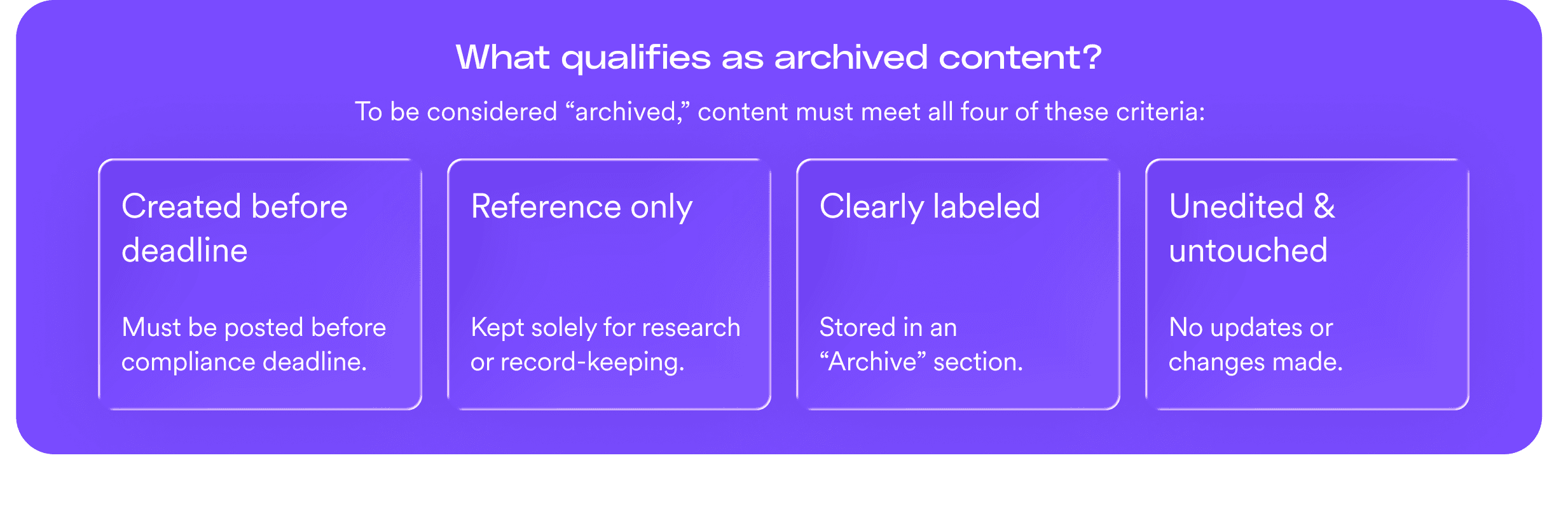
Age alone does not make content exempt. To qualify as “archived,” it must no longer be part of delivering a current public service.
For a file to remain inaccessible under the archived content exception, it must meet all four conditions:
- Created before the compliance deadline: It was posted before April 2027 or April 2028, depending on your entity size.
- Used only for reference: It is kept strictly for historical research or record-keeping and is not required for any active service.
- Clearly labeled: It is stored in a dedicated section marked “Archive.”
- Unedited: If the file is modified in any way, it must be made fully accessible.
Reason #4: They misunderstand what “undue burden” allows
Undue burden is one of the most misunderstood concepts in Title II.
So, in practical terms, undue burden:
- Applies to a specific piece of content, not your entire website
- Can change over time as budgets and staffing change
- Must be formally documented and justified
- Does not remove your obligation to provide access through alternatives
Undue burden is not a blanket exemption, permanent shield, or substitute for prioritization.
Reason #5: They confuse using tools with accountability
Automation tools play an important role in identifying accessibility issues at scale.
But tools do not define Title II scope—and they do not make prioritization decisions.
DOJ enforcement actions focus on whether people with disabilities can access services, not on scan scores or error counts.
Letting automated results dictate strategy often leads to:
- Over-prioritizing low-impact issues
- Missing barriers in critical workflows
- Confusing technical output with legal exposure
Bottom line: Responsibility for prioritization always remains with the public entity.
Why these challenges persist
If your agency is struggling to keep up with digital accessibility, you aren’t alone. These hurdles are rarely the result of neglect; they reflect the complex reality of modern government operations, including:
- Managing thousands of legacy files and “hidden” documents can create a significant content overload.
- Digital assets are often spread across dozens of departments, leading to divided ownership and oversight.
- Leadership must constantly balance accessibility with competing mandates for security, privacy, and general modernization.
- Limited budgets and staffing create resource gaps that make it nearly impossible to address every issue at once.
Research from organizations like NASCIO and Deloitte shows that most public-sector leaders must make risk-based, phased decisions for all their projects.
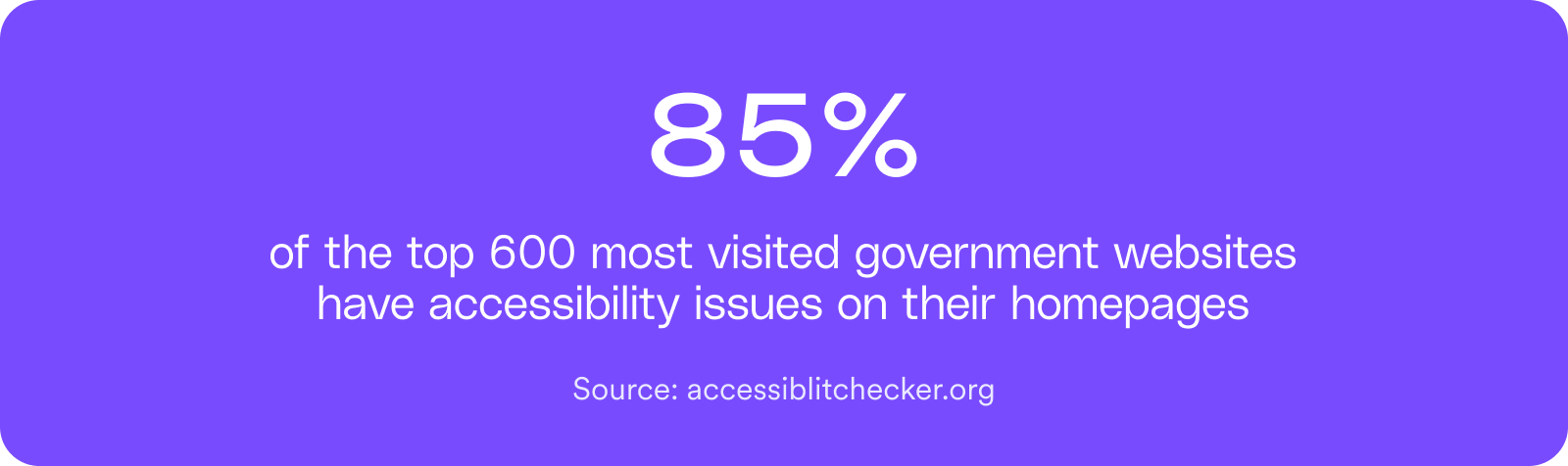
Our scan of more than 600 public-sector and higher education websites — conducted in partnership with the third-party scanner accessibilitychecker.org — reinforces this reality: accessibility errors remain common across public-facing sites, reflecting the operational challenge of managing accessibility across distributed digital systems.
These constraints don’t change Title II obligations, but they explain why structured prioritization is essential.
These services appear across many types of public entities—from state agencies and municipalities to transit authorities, courts, utilities, and special districts.
The five enforcement “hot zones”
While the law covers your entire digital footprint, Attorney General Merrick B. Garland has explicitly identified several essential services as high-priority areas for federal oversight. These are the “Hot zones”—the critical functions where the Department of Justice (DOJ) has signaled that a digital barrier is most likely to result in a civil rights violation or legal action.
1. Voting and elections
Voting is a fundamental right. Any barrier that prevents a resident from registering or finding their polling place is considered a high-priority failure.
- Examples of what to fix: Voter registration portals, polling place locators, and ballot instructions.
- The risk: Posting polling information as a scanned image PDF that a screen reader cannot “read.”
2. Courts and justice systems
The justice system depends on due process. If a resident cannot respond to a summons or file a document online, they are being denied access to the legal system.
- What to fix: E-filing portals, jury summons systems, and fine payment tools.
- The risk: If responding to a summons requires a mouse click, a keyboard-only user may be unable to file on time.
3. Health and human services
These services are the safety net for your community. Digital barriers here can delay or deny the essential support residents need for basic survival and health.
- What to fix: Applications for food aid or health insurance, and public health alerts.
- The risk: Form error messages that are visible in red text but aren’t “spoken” to a blind user, leaving them stuck without knowing why.
4. Transportation and mobility
Digital tools are now the gatekeepers to the physical world. If a transit app is broken, a resident may be physically unable to get to work or a medical appointment.
- What to fix: Transit schedules, real-time service alerts, paratransit applications, and transportation authority service portals or rider apps.
- The risk: Apps that don’t allow users to zoom in on text or have poor color contrast for low-vision users.
5. Licensing, permitting, and payments
These are the “must-do” tasks of local government. Because they are mandatory and have firm deadlines, they are the most frequent targets for legal complaints.
- What to fix: Utility billing portals, tax payment systems, permit applications, and professional license renewals.
- The risk: A payment portal where a screen reader can’t “see” the field where the user needs to enter their credit card number.
These high-impact services often represent the areas where accessibility barriers create the greatest risk for residents and the greatest exposure for public entities.
To help agencies determine whether digital content is in scope, archived, or requires remediation, we’ve created an interactive decision tree based on DOJ guidance.
How accessiBe helps public entities comply with Title II
Preparing for the April 2027 and 2028 deadlines is challenging. Digital services across state and local governments evolve constantly and are rarely managed by a single team. Accessibility responsibilities are often layered onto already complex IT, service delivery, and compliance priorities.
AI-driven automation for scale
Government websites and service portals change frequently — new announcements, updated forms, seasonal programs, and service alerts. Continuous monitoring helps identify accessibility issues early, providing consistent coverage without overwhelming internal teams.
Tools for technical teams
Agency developers and IT teams are rarely accessibility specialists. Developer-focused tools provide visibility into accessibility status across websites, portals, and digital services, along with practical guidance to support implementation and ongoing updates.
Expert support where judgment is required
Some digital assets — such as complex forms, legacy document libraries, and critical service workflows — require specialized review. Accessibility experts assist with document remediation, workflow evaluation, and remediation strategy where automation alone is not sufficient.
Activity is tracked and compiled into structured reports reflecting findings, actions taken, and progress over time — creating a documented record of oversight and measurable effort.
Because digital services continuously evolve, accessibility cannot be treated as a one-time project. Ongoing monitoring and reporting remain essential.
If your agency is preparing for the upcoming Title II deadlines, our accessibility specialists can review your current approach and help identify practical next steps. Book a call.
Frequently asked questions about government ADA Title II responsibilities
Q1. What is the new ADA Title II rule for state and local governments?
A1. In April 2024, the Department of Justice (DOJ) finalized a rule clarifying that Title II of the Americans with Disabilities Act (ADA) applies to all digital services, programs, and activities provided by state and local governments. This includes websites, mobile apps, and digital documents like PDFs. To meet these requirements, public entities must ensure their digital content conforms to Web Content Accessibility Guidelines (WCAG) 2.1 Level AA.
Q2. When are the official deadlines for compliance?
A2. Deadlines are based on the population size served by the public entity. Large entities (serving 50,000 or more people) must ensure their digital content is conformant by April 28, 2027. Smaller entities (fewer than 50,000 people) and special district governments have until April 28, 2028, to meet the same standard.
Q3. Does Title II apply to third-party apps and vendor-provided services?
A3. Yes. Public entities are legally responsible for the accessibility of any digital service they “provide or make available,” even if it is operated by a third-party vendor. This includes parking apps, utility payment portals, and online ticketing solutions used on behalf of the agency. Agencies should tighten procurement requirements to ensure all purchased products conform to WCAG 2.1 Level AA.
Q4. Are older documents and legacy content exempt from these rules?
A4. Not necessarily. Content is not exempt simply because of its age; its status depends on whether it is still “actively in use” to provide a service. For a file to qualify for the “archived web content” exception, it must have been created before the deadline, be kept exclusively for historical research or record-keeping, be stored in a dedicated and clearly labeled “Archive” section, and remain unedited.
Q5. Can we provide an “accessible alternative upon request” instead of remediating content?
A5. Under the new rule, public entities cannot rely solely on a reactive “upon request” model for digital services that are required to complete a task or exercise a right. Digital assets used to deliver programs must be accessible by default up front to ensure people with disabilities have an equitable and timely experience.
Q6. What does “undue burden” mean under Title II?
A6. “Undue burden” refers to actions that would cause significant difficulty or expense when evaluated against the public entity’s overall available resources. This is not a blanket exemption but a narrow, case-specific exception that requires thorough documentation and review. Even if an exception is granted, the agency must still provide access through the best alternative possible.
Q7. How can accessiBe help our agency meet these Title II requirements?
A7. accessiBe provides an end-to-end accessibility platform combining the best in AI automation, human expertise, and developer tools to help agencies manage Title II alignment. This includes expert document remediation services for complex PDFs, accessFlow for developers to build accessibility into the source code of new portals and apps, and accessWidget for session-based, scalable remediation across existing web pages.
Q8. The Title II deadline was just extended — what does that mean for our obligations?
A8. On April 20, 2026, the DOJ published an interim final rule extending compliance dates by one year — April 26, 2027 for larger public entities, April 26, 2028 for smaller ones. The extension applies to dates only. The scope of what’s covered, the WCAG 2.1 Level AA technical standard, and the ongoing obligation to provide accessible digital services all remain unchanged. Agencies that use the extension to build structured, documented accessibility programs will arrive at the new deadline in a defensible position. The deadline moved. The obligation didn’t.